


Disney Cruise Line Navigator
4.17.05K Reviews
App Specs
- Version
- 5.49.0
- Updated On
- License
- Free
- Downloads
- 1,000,000+
- Developer
- Disney
- Categories
- Travel & Local
- Platform
- Android, iOS
Screenshots
 Analysis by AppCompare
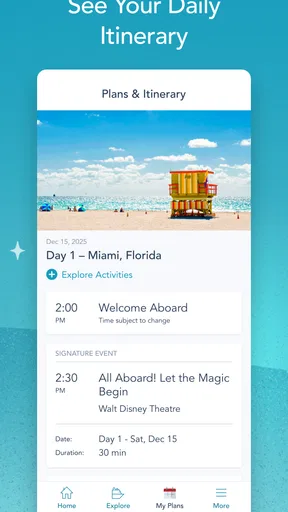
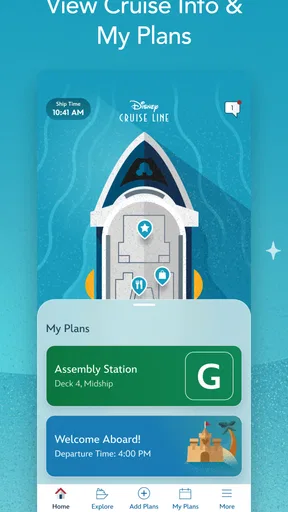
Disney Cruise Line Navigator is the kind of travel app I would install before boarding rather than discover halfway through a sailing. Created by Disney for its cruise guests, it brings planning tools, onboard communication, payments, activities, and entertainment into one place. I found its value less in any single spectacular feature and more in how it reduces the need to carry a paper schedule, search through separate messages, or visit a desk for every small decision.
The app is free, aimed at Everyone, and sits in the Travel & Local category. It has been available since September 6, 2013, and its current version is 5.49.0 for devices running iOS 11 or later. With more than 1 million installs, a 4.1 average from roughly 19,000 ratings, and about 7,000 written reviews, it is clearly used by a substantial number of Disney Cruise Line travelers. Those figures do not make it perfect, but they do match my impression of a mature companion app that is useful when treated as part of the cruise routine rather than as a general vacation planner.
How I would use it from planning to the first day onboard
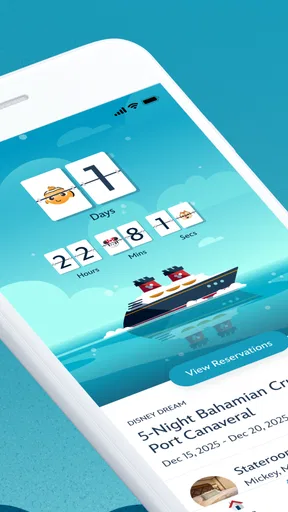
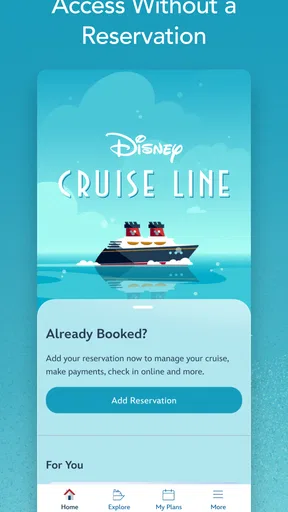
My baseline workflow would begin before leaving home. I would install the app, sign in with the cruise details it requests, and spend a few minutes looking through the available planning areas. The important habit is not to wait until the ship is busy or the family is already asking what happens next. I would use the quiet time before departure to become familiar with where activities, entertainment, payments, and chat appear.
That preparation matters because cruise days are full of short decisions. Someone may want to know what is happening after lunch, another person may be looking for entertainment, and a child may be interested in a particular activity while the adults are trying to coordinate. Navigator gives those questions a shared home. I would check the schedule at the beginning of the day, then return to it whenever plans change instead of trying to remember everything from a quick glance.
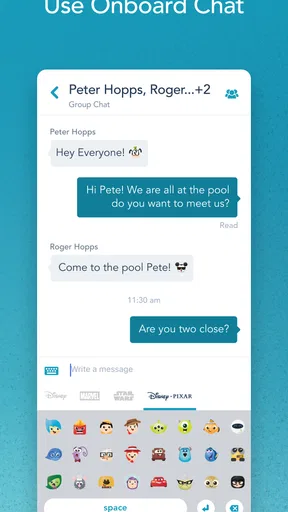
The onboard chat is especially practical for groups that split up. A family does not always move as one unit on a ship, and relying only on shouted instructions or a prearranged meeting point can become tiring. I would use the chat to confirm simple changes such as where to meet or whether someone has finished an activity. It is not a replacement for thoughtful planning, but it can make casual coordination much easier.
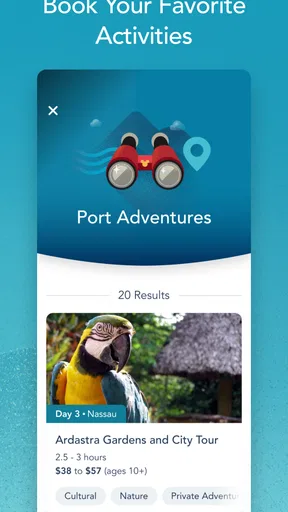
Payments and bookings are another reason to keep the app close. Having those actions in the same cruise companion means I would not need to switch between a general travel app, a browser, and a separate messaging tool every time I wanted to manage something connected with the sailing. I would still review any booking carefully before confirming it, particularly when several family members are making choices at once. Convenience is helpful, but a larger screen or a calm moment may be better for checking details than a rushed tap while walking around.
A realistic day might look like this: in the morning, I would scan the day’s entertainment and activities, then make a loose plan rather than filling every hour. After lunch, I would use the app to check what is still available and message the rest of the group if I changed direction. Later, I would review any payment-related action before completing it. This approach keeps Navigator useful without turning the holiday into a sequence of appointments.
Worth Reading Before You Choose

EA SPORTS FC Mobile 26 Is a Bigger Football Game, but It Takes Time

Flipboard Shows What News Apps Must Do Beyond the Feed

Switching to Android Auto Means Rethinking Your Driving Routine

Google Calendar Makes a Crowded Week Easier to Manage

Ludo King Makes the Most of the Minutes Between Plans

Baby Panda World Brings Quick Play to Modern Phones, but Its Game Library Feels Busy
I also like the idea of using the app as a reference point for people who do not want to ask a crew member every minor question. That said, I would not treat it as the only source of help. If a matter is urgent, personal, or unclear, speaking with Disney Cruise Line staff remains the sensible choice. An app can organize information, but it cannot replace human assistance in every onboard situation.
Settings and preparation that are worth checking
Before the cruise begins, I would check the app’s notification behavior and make sure the phone is comfortable to use throughout a long day. The best setting is not necessarily the one that sends every possible alert. Too many notifications can make important schedule changes harder to notice, especially when a family member is already receiving messages from work, school, and other travel services.
I would also check that the correct cruise information and guest details are visible after signing in. This is a small but valuable habit: if the app is being used by more than one person in the household, confusion can arise when someone assumes that every screen applies to the same guest or booking. Confirming the context early is faster than discovering a mismatch when trying to make a booking or payment.
Phone storage and battery deserve attention too. Navigator is likely to be used repeatedly during the day, alongside the camera, maps, and other travel tools. I would start each morning with a charged phone and carry a charging option that fits my travel plans. This is not a special weakness of Disney Cruise Line Navigator; it is the practical cost of using a phone as a cruise schedule, communication device, and payment tool at the same time.
For families, I would agree on a simple shared routine. One person can check the schedule in the morning, while each adult knows how to open chat and review relevant plans. This avoids a common problem where the app is installed on one phone but nobody else knows how to find the information when that phone is unavailable. A second person learning the basic workflow is more useful than one person memorizing every screen.
I would also avoid changing important plans from a moving queue or while distracted. Activities, entertainment, and payments can all feel simple, but the consequences of selecting the wrong item or overlooking a detail are greater when the user is rushing. My preferred pattern is to browse first, discuss with the group, and confirm only after everyone understands the choice.
Shortcuts that make repeated use less tiring
The fastest users will probably not open the app randomly throughout the day. They will build a few repeatable checks. My first would be a morning review, followed by a quick look whenever the group finishes a meal or returns to the room. Those natural transition points are easier to remember than setting an elaborate personal system.
I would also separate browsing from committing. Browsing the activity and entertainment options can be casual, but bookings and payments deserve a deliberate pause. That distinction reduces accidental decisions and makes the app feel less demanding. It is one of the more useful habits because the app combines information with actions that may affect the rest of the day.
Chat works best when messages are specific. Rather than writing “Where are you?”, I would send a clear meeting suggestion and a time, then update it if plans change. This keeps the conversation useful and avoids turning the onboard chat into a stream of vague messages. For a group, a short message with a concrete next step is easier to act on than several back-and-forth questions.
Another good pattern is to let the app support a flexible plan instead of trying to make it carry the entire holiday. I would choose a few priorities, leave room for spontaneous entertainment, and use Navigator to check what fits around them. That approach makes the schedule a tool for discovery rather than a source of pressure.
When several people want different activities, I would use the app to compare options together before splitting up. This is more efficient than each person independently searching and then discovering that the times conflict. It also makes the chat more useful because the group has already agreed on the general shape of the day.
For payments, I would review the action immediately after completing it and keep personal confirmation habits consistent. I would not hand the phone around casually when a payment screen is open, and I would avoid making a transaction while someone is interrupting me. These are ordinary precautions, but they matter more in a busy travel environment where a small mistake can be difficult to untangle later.
Where the app is strong and where its limits show
Navigator’s strongest quality is concentration. A cruise involves schedules, entertainment, activities, communication, and spending, and this app places those cruise-specific tasks in one environment. A general calendar can hold reminders, a messaging app can handle conversation, and a travel website can provide booking information, but none of those alternatives is as naturally connected to the onboard experience.
The trade-off is that the app is not a complete replacement for every travel tool. Before the cruise, I would still want ordinary travel resources for flights, hotels, directions, and broader trip planning. Navigator makes the most sense once the cruise itself becomes the center of attention. Someone looking for a universal vacation organizer may find it too focused, while a Disney Cruise Line passenger is more likely to appreciate that focus.
I would also be realistic about phone dependence. If the battery is low, the device is shared, or a guest is uncomfortable with mobile apps, the convenience becomes less automatic. A family should not assume that every person will use the app in exactly the same way. It is better to decide who needs chat, who will handle bookings, and who simply wants to view the day’s options.
The amount of information can create its own friction. A busy cruise schedule may present more choices than one person can reasonably process. My solution would be to filter mentally: first identify the activities that matter most, then use the app to fit them together. Trying to inspect everything at once can make the experience feel like administration instead of a holiday.
There is also a difference between seeing an option and having a practical plan. An activity may look appealing, but the group may be eating, resting, or doing something else at the same time. Navigator helps with visibility and organization; it does not make those trade-offs disappear. I consider that a healthy limitation because it leaves room for personal judgment rather than pretending an app can plan a family’s day perfectly.
Compared with paper schedules, the app is easier to update and more useful for communication and payments. Compared with separate messaging and calendar tools, it keeps cruise-related information together. Compared with a general travel app, it is narrower but more relevant onboard. I would choose Navigator alongside those tools, not necessarily instead of all of them.
Who should install it and who may be better served elsewhere
I would recommend it to Disney Cruise Line guests who want one place to check activities, entertainment, onboard chat, bookings, and payments. It is particularly suitable for families and groups that expect to separate during the day and reconnect later. The ability to keep plans visible and communicate within the cruise context is more valuable when several people have different interests.
It is also a good fit for travelers who prefer self-service. If you like checking options on your own, adjusting plans, and keeping a personal view of the day, the app should feel natural. Its free price makes it easy to try before deciding how heavily to rely on it.
I would be less enthusiastic for someone who wants a broad travel-management app covering every part of a vacation. Navigator is not the tool I would use to organize a complete journey from airport departure to hotel checkout. I would also suggest a backup approach for anyone who dislikes phone-based planning or expects unreliable access to their device. The app can be central without being the only method of staying informed.
Users should also know that the minimum operating-system requirement is iOS 11, so checking device compatibility before departure is sensible. A cruise is a poor time to discover that an older phone cannot run the current version. The app is free, but the wider cruise decisions it helps manage may still involve bookings or payments, so I would never interpret “free” as meaning every activity or purchase inside the cruise experience is cost-free.
The Everyone age rating makes it approachable for a household, but that does not mean every guest needs unrestricted responsibility for bookings or payments. I would let children explore schedules with an adult nearby and keep financial actions with the person who is meant to approve them. That division is simple and avoids unnecessary confusion.
My verdict after building a repeatable routine
Disney Cruise Line Navigator works best when I use it as a daily control panel rather than an app I open only when something goes wrong. A morning schedule check, sensible notification choices, clear chat messages, and a careful pause before bookings or payments turn its broad feature set into a practical routine.
The app’s 4.1 average suggests a generally positive reception with room for individual frustrations, and that matches my balanced view. Its focus is a strength for Disney Cruise Line passengers, but a limitation for anyone seeking a complete travel organizer. It also depends on the user keeping a phone ready and resisting the temptation to over-plan every hour.
My final recommendation is straightforward: install it before the sailing, sign in early, learn the paths to the schedule, chat, entertainment, activities, and payment areas, then decide which parts your group will actually use. Do not wait until everyone is hungry, tired, or moving between plans. Used with that small amount of preparation, the app can remove a surprising amount of everyday friction and leave more attention for the cruise itself.
Pros
- Daily schedules
- dining times
- and activity details are easy to browse.
- Deck maps help guests locate restaurants
- pools
- theaters
- and onboard venues.
- Chat features make it easier for families to coordinate during the cruise.
- The app provides useful port-of-call information and excursion details.
- It can reduce the need to carry printed schedules around the ship.
Cons
- Some features may require the ship’s Wi-Fi connection to work properly.
- Information can change quickly
- so schedules may not always be fully up to date.
- The interface may feel crowded for first-time Disney Cruise Line guests.
- Battery use can increase when checking maps
- schedules
- and notifications often.
- Most of the app’s usefulness is limited to guests with an active Disney cruise booking.
FAQs for Disney Cruise Line Navigator
What is Disney Cruise Line Navigator used for?
Disney Cruise Line Navigator is the official companion app for guests sailing with Disney Cruise Line. Before and during a voyage, it provides access to your itinerary, daily activities, dining information, entertainment schedules, character appearances, port details, and onboard announcements. It is designed to help you plan each day without carrying a printed schedule around the ship.
Do I need an internet package to use Disney Cruise Line Navigator onboard?
The app generally offers important onboard features through the ship’s Wi-Fi connection without requiring you to purchase a separate internet package. However, some functions may depend on your sailing, device, or current connection. Internet access for browsing websites, streaming, social media, or other online services is separate, so guests should check Disney Cruise Line’s current connectivity terms before relying on the app for general internet use.
Can I use the app before my Disney cruise begins?
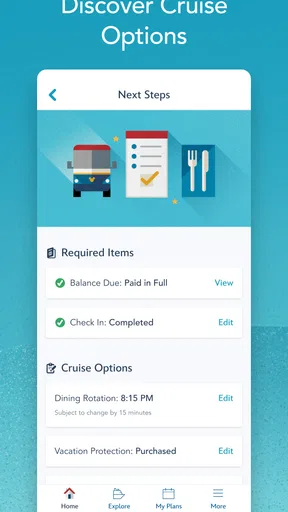
Yes, Disney Cruise Line Navigator can be useful before embarkation. Depending on your reservation and sailing, you may be able to review cruise details, complete or manage parts of the check-in process, explore planning information, and prepare for activities or port visits. The exact features available before departure can vary, so keeping the app updated and signing in with the correct Disney account is recommended.
Can I make reservations or book activities through Disney Cruise Line Navigator?
The app may allow guests to view and manage selected reservations, dining information, onboard activities, and other cruise plans, although availability depends on the ship, itinerary, and booking status. Some popular experiences have limited capacity and may require advance planning or reservations through Disney Cruise Line’s official booking process. Always review the app carefully after boarding for the most current options.
Is Disney Cruise Line Navigator available for both Android and iPhone?
Disney Cruise Line Navigator is intended for both Android and iOS devices, allowing most passengers to use the app regardless of their smartphone platform. Compatibility can depend on the operating system version and the specific device, so it is wise to install or update the application before traveling. Guests should also make sure their phone has sufficient storage and battery power for daily onboard use.


